

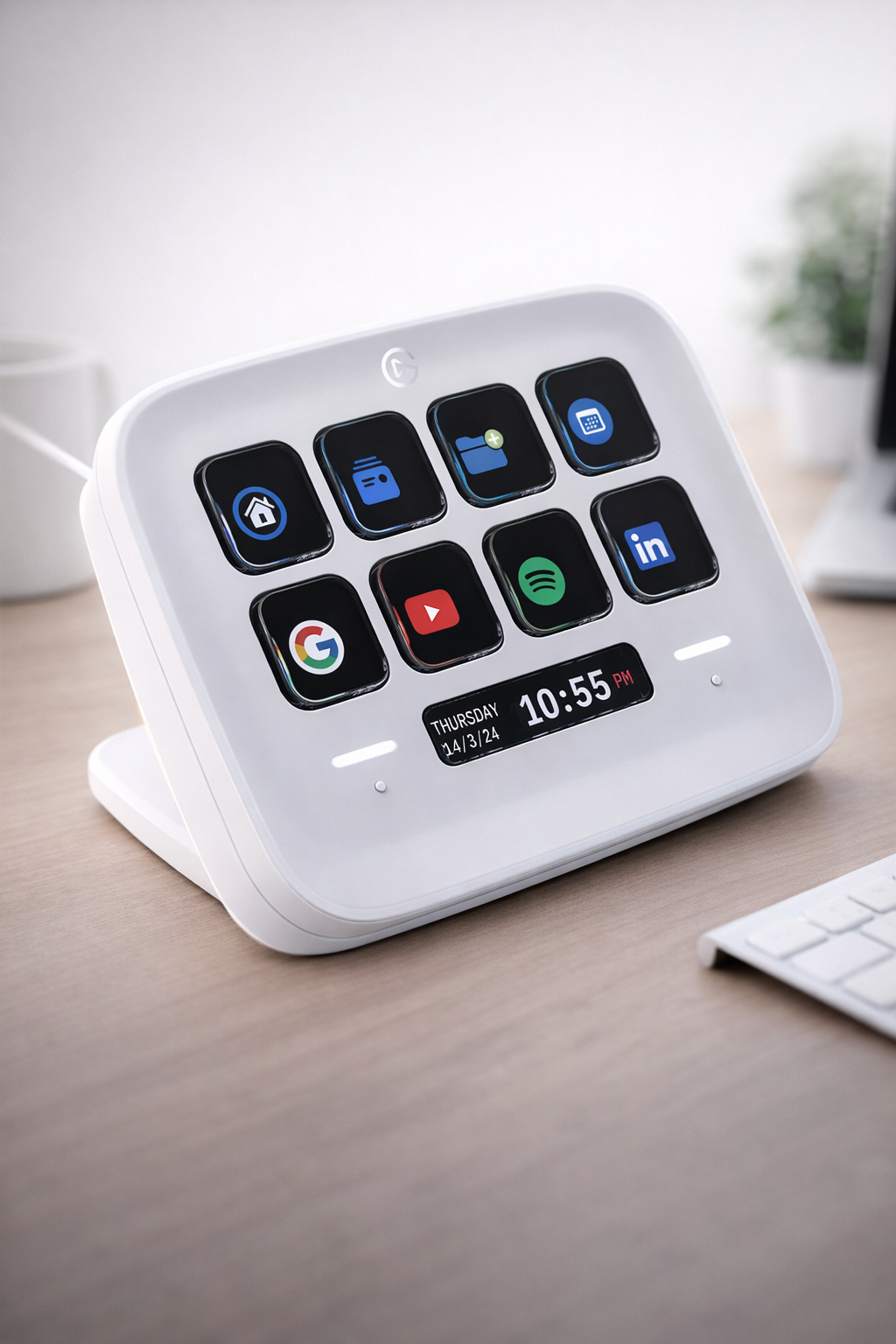
Elgato Stream Deck Neo – 8 Customizable Keys, 2 Touch Points
⭐ Voltger Score: 8.7 / 10 Best for: everyday productivity & casual creators Works best with: office work, multitasking, light automation
€76.79
CHECK PRODUCT AVAILABILITY & PRICE - https://amzn.to/4y2cFWO
Should you buy it?
👍 Buy it if
you want a simple productivity boost
you use apps like Teams, Zoom, Spotify, Office
you want something between Mini and MK.2
you like clean + modern desk setup
👎 Skip it if
you need many shortcuts visible at once
you want full creator-level control
Voltger Score: 8.7 / 10
Our verdict: Worth
Category | Score |
|---|---|
Usefulness | 9.0 |
Ease of use | 8.9 |
Build quality | 8.5 |
Value for money | 9.0 |
Reliability | 8.6 |
The problem
Most people:
waste time on small repetitive tasks
constantly switch between apps
use keyboard shortcuts they barely remember
But full Stream Deck setups:
👉 feel too complex or overkill
What it actually does
This is basically:
👉 Stream Deck simplified for everyday use
Key features:
8 customizable LCD keys
2 touch points + infobar (navigation system)
drag-and-drop setup (very easy)
You can:
mute mic in Teams
control Spotify
switch apps
automate small workflows
Our experience (realistic expectations)
What actually feels great
• super easy to set up (way easier than MK.2)
• perfect for daily tasks (not just streaming)
• touch navigation is actually useful
• clean modern design (looks better than older models)
• works well even for non-creators
👉 biggest difference vs others:
this is made for normal users, not just streamers
What people don’t tell you
⚠️ Still limited (8 keys)
better than Mini (6)
but still not enough for power users
⚠️ Not for heavy workflows
if you edit, stream, automate a lot → you’ll outgrow it
Pros• very easy setup | Cons• only 8 keys |
|---|
Final verdict
This is the most “normal user friendly” Stream Deck.
If MK.2 feels too much and Mini too limited:
👉 this is the sweet spot
⭐ Worth it — especially for productivity, not just content creation
CHECK PRODUCT AVAILABILITY & PRICE - https://amzn.to/4y2cFWO
Still unsure?
If you:
✔ use Teams / Zoom / Spotify daily
✔ want faster workflow
✔ don’t want complexity
→ this is perfect
If you:
✖ want full control
✖ run complex setups
→ go MK.2 or XL
Hardware
Device type: Customizable macro controller (productivity control pad)
Keys: 8 customizable LCD keys
Touch controls: 2 touch points + Infobar navigation strip
Key type: LCD buttons with dynamic icons & visual feedback
Interface: USB connection (wired)
Functionality
One-touch actions: launch apps, control tools, trigger shortcuts
Macro support: multi-step workflows via single button
Profiles: multiple profiles with app-based switching
Navigation: touch-sensitive controls for switching pages/layouts
Drag-and-drop setup: simple configuration via Stream Deck software
Software & Compatibility
Software: Elgato Stream Deck app
Operating systems:
Windows 10 (64-bit) or newer
macOS (latest supported versions)
App integrations:
Microsoft Office (Word, Excel, PowerPoint)
Teams, Zoom
Spotify
OBS, Discord, and more
Connectivity
Host connection: USB to PC / Mac
Plug & play: quick setup via software
No external power required
Customization
Custom icons: upload and personalize each key
Folders/pages: expand beyond 8 keys using layouts
Multi-actions: combine multiple commands into one button
Profiles: auto-switch based on active app
Physical
Form factor: compact desktop controller
Design: modern slim layout with touch strip
Dimensions: approx. 4.2 × 3.1 × 1.0 inches
Weight: ~0.44 lb (≈200 g)
Color options: White / Black
Included in the Box
Elgato Stream Deck Neo
USB cable (integrated or included depending on version)
Quick start guide
Functional Features
One-touch workflow automation
Touch navigation between layouts
Visual feedback via LCD keys
App-based smart profiles
Integration with productivity & creative tools
"Where gadgets actually make sense." We're a team of tech enthusiasts tired of the hype. We review products based on real-world utility, not spec sheets.
voltger@outlook.com
© 2026. All rights reserved.